
MEPCO Bill Online Check Duplicate | Mar 2026
Check MEPCO Online Bill | Download Duplicate Bill
If you want to check your MEPCO electricity bill online, our website makes the process quick and completely free. You can easily view your WAPDA bill details, including bill amount, electricity units consumed, due date, and payment status. In addition, the platform allows you to access your complete bill summary anytime. You can also download a duplicate copy of your MEPCO bill or print it for bill payment purposes. This simple and user-friendly tool helps you stay updated with your electricity bill information online without any hassle.
MEPCO Bill Online
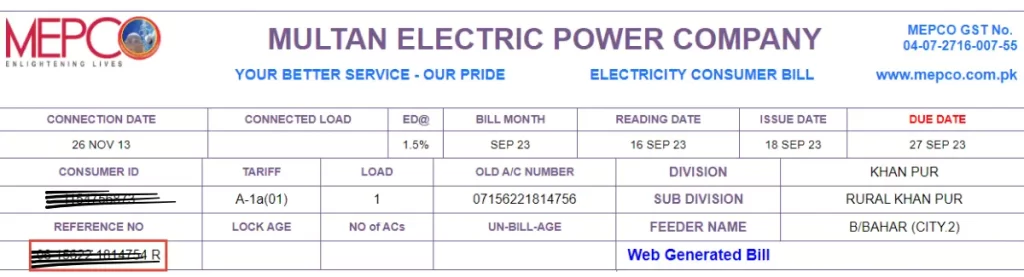
To check your MEPCO bill online, simply enter your 14-digit reference number in the given input box. If you do not remember your reference number, you can also use your Customer ID to access your bill details. Once you provide the required information, your MEPCO electricity bill details—including bill amount, units consumed, due date, and payment status—will be displayed instantly. If you are unsure where to find your reference number or Customer ID, you can easily locate them in the highlighted section shown in the image below.
If you want to check your previous MEPCO electricity bills, you can easily access your MEPCO bill history or old paid bills through the relevant section on the website. This allows you to review your past bill records, payment history, and electricity usage details anytime. Additionally, if you prefer using a mobile device, you can download the MEPCO online bill app from the Google Play Store or other supported app stores for your device. This makes it even easier to track your electricity bill status, duplicate bills, and payment information on
About MEPCO
MEPCO (Multan Electric Power Company) is one of the major electricity distribution companies in Pakistan. It is responsible for supplying reliable power to residential, commercial, and agricultural consumers across its service regions. Established in 1998, MEPCO operates as a public sector utility company and plays an important role in managing electricity distribution, billing services, and power supply operations. The company ensures efficient delivery of electricity while maintaining energy management and customer service systems for millions of users.
Areas Under MEPCO
MEPCO Service Areas
MEPCO has the responsibility to supply electricity in the following areas:
| Dera Ghazi Khan | Lodhran | Layyah |
| Multan | Bahawalpur | Pakpattan |
| Rahim Yar Khan | Khanewal | Sahiwal |
| Vehari | Shadan Lund | Muzaffargarh |
| Bahawalnagar | Kot Addu | Taunsa Sharif |
| Fort Munro | Rajanpur | Tribal Areas of Koh E Sulaiman |
| Basti Maluk | More | More |
If you live in any of the areas listed above and want to check your electricity bill (bijli bill), you are in the right place. Simply enter your reference number or customer ID in the search box. Within a few seconds, your MEPCO online bill details will be displayed on your screen.
Residents of Multan can also easily check their MEPCO electricity bills online using this tool. If you are looking for the official MEPCO website, you can visit www.mepco.com.pk for more information and services.
MEPCO Bill Online Information
Once your MEPCO online bill appears on the screen, you can easily view your current bill amount, along with the due date for payment. You can also check important details such as the meter reading date and the electricity units consumed. Just below the payable amount, you will find any late payment charges or surcharge, which are applied only if the bill is not paid before the due date. In addition, the system allows you to access your previous 12 months’ bill history, helping you track your electricity usage and payment records over time.
MEPCO Peak Hours
MEPCO advises consumers to reduce electricity usage during peak hours. During these times, electricity consumption becomes more expensive, and units are consumed at a faster rate. Using less electricity in peak hours not only helps save energy but also supports a stable electricity supply across different areas.
| Season | Peak Hours |
|---|---|
| December to February | 5 PM – 9 PM |
| March to May | 6 PM – 10 PM |
| June to August | 7 PM – 11 PM |
| September to November | 6 PM – 10 PM |
How to Check Your MEPCO Bill Online?
You can easily check your MEPCO bill online through our website, but you need to enter either your reference number or customer ID to access your electricity bill details. Follow these simple instructions:
- Go to the search boxes provided above.
- Enter your reference number in the reference field to view your MEPCO bill information.
- If you don’t have a reference number, you can check your bill using your consumer ID.
- To see complete billing details, click on the “Full Bill” option, and your detailed bill will be displayed.
Please note that you cannot check your MEPCO bill online using your mobile number or CNIC. This platform is designed to provide quick and easy access to your MEPCO online bill, making the process simple and user-friendly.
Extension in Due Date Of MEPCO Bill
Sometimes, the due date of your MEPCO bill passes, and people are unable to pay the outstanding amount on time. There can be several reasons for this, such as receiving a late electricity bill or not having sufficient funds before the due date. In such situations, there is a small relief available that allows you to request a due date extension on your bill.
Follow the instructions below to check how many days of extension you may be eligible for and how to proceed with the bill payment extension process.
3 Days Extension for Over 10 Thousand Bill
If your bill exceeds 10 thousand and you cannot afford to pay it by the due date, then you can request a 3-day extension by contacting the Assistant Manager Officer.
3 Days Extension for Over 25 Thousand Bill
If your bill amount is above 25 thousand rupees and you want an extension on the due date then you have to approach the Deputy Manager Officer. He can extend your due date for 3 more days.
5 Days Extension For Over 2 Lakh Rupees Bill
If your bill exceeds 2 lakh rupees then the Billing Manager can only give you a 5 days extension.
On the other, only a Chief Executive Officer has the authority to extend the due dates above 5 days in some necessary cases.
MEPCO Bill Online SMS Alert
If you are a busy person and sometimes forget to pay your electricity bill before the due date, you can activate an SMS alert service to stay updated. This service will notify you about your bill amount, billing details, and due date in advance.
To avail this facility, simply send an SMS to 8334 by typing: pitc <space> reference number. This will help you receive timely notifications and avoid late payment charges on your electricity bill.
New Line Connection and Transfer Procedure
If you are unsure about the procedure for a new electricity connection or transfer, you can follow the detailed guidelines below:
Application:
To apply for a new MEPCO connection, you need to submit an application. You can do this in two ways: either visit the MEPCO customer service center or apply online through the official website for a new electricity connection.
Feasibility Study:
After receiving your application, MEPCO will conduct a feasibility assessment. This includes evaluating technical, financial, and environmental factors. The connection approval process may take a few days to a week.
Payment:
Once the feasibility study is completed, MEPCO will inform you about the cost of the new connection. You will need to pay the required charges, including security fees, connection charges, and meter installation costs.
Site Analysis:
After payment, the MEPCO team will perform a detailed area analysis to ensure the location is suitable for a safe and stable electricity connection.
Meter Installation:
Once the analysis is complete, the team will install the electricity meter and connect your premises to the power grid. The time required depends on resource availability, safety checks, and existing electric line infrastructure.
After the meter installation, your electricity connection will be activated. Make sure to pay your MEPCO bill on time to ensure uninterrupted power supply.
Register and Track Complaints
If you notice a difference between your meter reading and the billed amount, you can file a complaint through two convenient methods. One option is to visit your nearest MEPCO office and report the billing issue in person. The second option is to submit an online complaint through the official website, making it easier to resolve meter reading discrepancies without visiting the office.
MEPCO Online Complaint Registration
The addition of an online complaint system in the management process is a great improvement. It allows you to submit your complaint at any time through the website and receive a quick response from the support team. Make sure to provide all the required details when submitting your complaint to avoid delays.
Follow these steps to register your complaint online:
- Click on the CCMS link.
- Create your account on the complaint management system.
- After logging in, enter your reference number or registered mobile number for verification.
- Once verified, your connection details will be displayed on the screen.
- Write your complaint in detail in the complaint section and click on the submit button to complete the process.
MEPCO Complaint Track
To check your complaint status in the system panel, follow these simple steps:
- Click on the complaint tracking option.
- Enter your reference number to track your complaint.
- Then click on the search button, and your complaint status will be displayed on the screen.
After submitting your complaint, it will usually be acknowledged within 24 hours, and the initial process will begin. In most cases, action is taken within one to two days, while the maximum resolution time can be up to 14 days depending on the issue.
MEPCO Bill Instalment Procedure
If you are facing financial difficulties due to inflation or your electricity bill amount is unusually high, and you are unsure how to pay your MEPCO bill in instalments, there’s no need to worry. MEPCO provides a relief option that allows consumers to manage their bills through easy instalment plans.
The rising cost of oil and other essential resources is one of the main reasons behind increased electricity tariffs. As a result, many people, especially from low-income communities, face challenges in paying their bills on time. To help in such situations, MEPCO offers the facility to convert your electricity bill into instalments.
You can apply for a MEPCO bill instalment plan by contacting the relevant authorities or officers, who are authorized to approve and facilitate the process, making it easier for you to manage your electricity payments.
3 Instalments for 10 Thousand Rupees Bill
You need to contact the Assistant Manager (Operations) to avail this facility if your MEPCO bill amount is up to 10,000 PKR. They are authorized to help you set up an instalment plan and provide relief in manageable payments.
You can also approach the same officer if your electricity connection has been disconnected due to non-payment and your outstanding bill is up to 20,000 PKR. They can guide you on restoring your connection and arranging the bill payment in instalments.
3 Instalments for More Than 1 Lakh Bill
You need to contact the Deputy Manager (Operations) if your MEPCO bill exceeds 200,000 PKR to avail the instalment facility. They are authorized to approve and manage high-amount bill instalment plans.
You can also reach out to the same officer if your electricity connection has been disconnected due to non-payment of a bill around 100,000 PKR. They will guide you through the process of restoring your connection and arranging the outstanding amount in instalments.
4 Instalments for More Than 5 Lakh Bill
You need to contact the Manager (Operations) to avail the facility of paying your MEPCO bill in 4 instalments if your bill exceeds 200,000 PKR. The manager is authorized to approve and manage such high-value instalment plans.
You can also get in touch with the Manager if your electricity connection has been disconnected due to non-payment of a bill around 500,000 PKR. They will guide you on restoring your connection and arranging the outstanding amount in manageable instalments.
12 Instalments For More Than 10 Lakh Rupees
You can contact the Chief Engineer to avail the facility of paying your MEPCO bill in 12 instalments if your bill exceeds 1,000,000 PKR. This option is designed for high-value bills to make payments more manageable.
If your electricity connection has been disconnected due to non-payment of a 1,000,000 PKR bill, you can have your connection reactivated by paying the outstanding amount in 6 instalments, as authorized by the Chief Engineer.
In rare cases, you need to approach the Chief executive officer to resolve the issue.
Verify MEPCO Bill Paid or Not
MEPCO provides electricity to millions of consumers and also makes it easy to pay your bills online. Additionally, you can verify whether your bill has been paid using several convenient methods. Follow these steps to check your bill payment status:
1. Online Portal:
If you have an account on the official MEPCO website, log in to your account. There, you can easily check the status of your online bill payments.
2. SMS Service:
Send a text message with your Customer ID to the official number provided by MEPCO. You will receive an SMS confirming whether your bill has been paid.
3. Customer Service Helpline:
You can also contact MEPCO’s customer service helpline. Provide your consumer ID, and they will inform you about your bill payment status.
4. Mobile App:
If you are using the MEPCO mobile app, log in to your account on your smartphone. The app allows you to check your bill payment status anytime.
Important: Always make sure you are using official MEPCO sources to verify your payment to avoid any misinformation or fraud.
MEPCO Bill Online Payments Methods
Paying MEPCO bills online is a convenient and time-saving method. It allows you to pay your electricity bills from anywhere, even if you are outside the city. Although MEPCO has not yet launched its own dedicated online billing portal, several third-party platforms offer this facility, including Easypaisa, JazzCash, and other mobile payment apps.
To use the online bill payment service, make sure you have sufficient funds in your account. Here are some popular methods to pay your MEPCO bill online.
Via Online Banking
Here is the method to pay your bills through online banking.
- Open your Bank account application.
- Search the option of “Paybill” in your bank app.
- Select the MEPCO out of all billers.
- Enter your bill consumer number and the amount you want to pay.
- Don’t forget to check your information twice before confirmation.
- After double checking, click on the confirm payment.
- You will get a confirmation notification after the transaction.
Via Easypaisa
Almost everyone has installed the Easypaisa app on their mobile, so it is the easiest method to pay bills online. Follow the steps to pay the bills.
- Open your Easypaisa app.
- You will see a “Bill Payment” option in front of the screen. Click on that.
- Next, it will show different bill types, but you will select “Electricity”.
- Now, various companies’ lists will appear, and tap on MEPCO.
- Provide your reference number, or you can scan our reference number.
- Now click on the “Pay” button.
Via Jazzcash
JazzCash is also widely used for transactions and different facilities like Easypaisa. You can also pay your electricity bill via Jazzcash, and you need to follow these steps:
- Open the JazzCash app on your mobile phone.
- You will see the ‘Utility Bills” option on the interface of the app. Just tap on it.
- There will be various bill types, such as Gas, Water, and Internet, but select the “Electricity” bill type.
- Now, a list of electricity service providers will appear, and you will select “MEPCO”.
- provide a reference number in the provided box.
- Enter the amount of your bill.
- Now, tap on the “Pay” option.
It is the most straightforward method to pay electricity bills via mobile app.
Via Daraz Wallet
Now, you can pay your bills via daraz wallet. For this purpose, your Daraz wallet must have the required amount. You can recharge your Daraz wallet through a bank card, and the bill payment process is almost similar to other apps.
Follow the steps to pay your electricity bills via the app, which is made for online shopping.
- Open the Daraz app on your smartphone.
- Create your account and add a wallet.
- Recharge your wallet via bank card.
- Navigate the “Bill Payment” option in the Daraz app.
- Select the electricity bill and then select MEPCO.
- Enter your reference number.
- Choose “Daraz Wallet” as your payment option.
- Click on the “Pay” button, and the payment will be deducted from your Daraz wallet.
These are all the easiest bill payment methods that you can use easily from anywhere in just a few seconds.
Taxes in MEPCO Bills
Your MEPCO electricity bill usually includes several taxes and surcharges. Here’s a breakdown of the main charges:
FPA (Fuel Price Adjustment):
FPA is a charge applied by rental power companies that use crude oil to generate electricity. It is added to MEPCO bills whenever there is a fluctuation in fuel or oil prices.
TR Surcharge (Tariff Rationalization Surcharge):
TR Surcharge reflects the difference between the electricity tariff set by NEPRA and the tariff determined by the Government of Pakistan (GOP).
- If the difference is positive, it indicates the tariff is lower, and the GOP pays a subsidy to balance the cost.
- If the difference is negative, the distribution company covers the gap by paying the amount to the government as Inter DISCO Tariff Rationalization Surcharge (IDTR SUR).
FC Surcharge (Financing Cost):
FC Surcharge is a fixed charge of 43 paisa per unit, applied to secure the repayment of debts owed by Power Holding Private Limited.
Deferred Bills:
MEPCO allows consumers to defer payment of their bill. The deferred amount can be paid in the same month or the next billing cycle. No extra charges are added, but the amount will be included in the total of the next bill.
Tips to Reduce Bill
- Unplug Devices: Many devices consume electricity even when not in use. Unplug chargers, appliances, and electronics to avoid phantom energy consumption.
- Replace Old Bulbs with Energy Savers: LED and energy-saving bulbs use less electricity and last longer than traditional bulbs.
- Use Energy-Efficient Appliances: When purchasing new devices, choose appliances with low energy consumption.
- Utilize Natural Light: Open curtains and windows during the daytime to minimize the need for electric lighting.
- Insulate Your Home: Proper insulation reduces heating and cooling costs in winter and summer.
- Avoid Peak Hours: Electricity rates are higher during peak hours. Reduce usage during these times.
- Dry Clothes Naturally: Hang clothes in the sun instead of using an electric dryer to save energy.
FAQs
What is a bill adjustment?
A bill adjustment is any reduction or modification in your electricity charges, applied by MEPCO when necessary.
What are sanctioned loads and connected loads?
The sanctioned or connected load is the total electricity supply allocated to your meter.
How can I conserve electricity and reduce my bill?
Tips include unplugging unused devices, avoiding peak hours, drying clothes naturally, washing clothes by hand, and turning off lights when not in use.
Conclusion
The MEPCO online bill platform offers a smooth and user-friendly experience for checking electricity bills. By providing your reference number or consumer ID, you can access full bill details, previous payments, meter readings, and due dates. The platform also offers information on customer care services, new connections, fee charges, and extensions for due dates.
With its easy navigation and convenient online billing management, the MEPCO online system simplifies the process of paying and managing your electricity bills effectively, enhancing the overall consumer experience.